

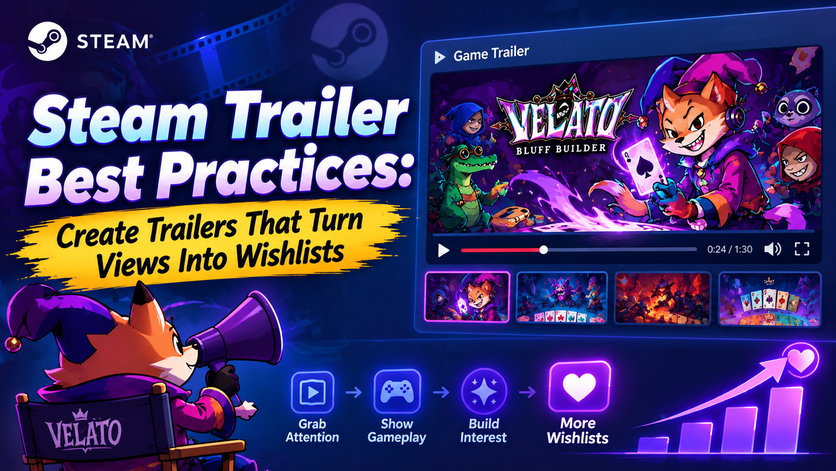
15 Proven Tips to Increase Wishlists
A Steam Store page has only a few seconds to convince a visitor to stay.
Your capsule art earns the click.
Your screenshots build curiosity.
But your Steam trailer is often what convinces a player to click “Add to Wishlist.”
For indie developers and solo developers, a well-crafted trailer can dramatically improve conversion rates without increasing your marketing budget. It showcases your gameplay, communicates your game’s identity, and builds confidence that your game is worth following.
The challenge is that many indie trailers are made like cinematic teasers instead of marketing assets. They spend too much time on logos, story introductions, or slow camera pans before showing what players actually care about: gameplay.
In this guide, you’ll learn Steam’s recommended trailer practices, common mistakes to avoid, and proven techniques used by successful indie games. Throughout the article, we’ll also analyze Velato as a real-world example of how to present gameplay effectively on a Steam Store page.
Table of Contents
- Why Steam Trailers Matter
- How Players Watch Steam Trailers
- Steam Trailer vs YouTube Trailer
- Steam’s Official Recommendations
- The First 10 Seconds Rule
- Anatomy of a High-Converting Trailer
- Velato Case Study
- Common Mistakes
- Steam Trailer Checklist
- FAQ
Why Your Steam Trailer Matters
Your trailer is one of the strongest conversion tools on your Steam page.
Unlike social media ads or YouTube videos, visitors who watch your trailer have already shown interest by clicking on your Store page. They’re actively deciding whether your game deserves a wishlist or purchase.
A great trailer answers several questions almost immediately:
- What genre is this?
- What does the player actually do?
- What makes this game unique?
- Does it look polished?
- Is it worth my time?
If your trailer answers these questions within the first few seconds, players are much more likely to continue exploring your Store page.
The Steam Wishlist Funnel
Think of your Store page as a conversion funnel.
Steam Impression
        │
        ▼
Capsule Art
        │
        ▼
Store Page Visit
        │
        ▼
Watch Trailer
        │
        ▼
View Screenshots
        │
        ▼
Read Description
        │
        ▼
Add to Wishlist
Every element supports the next.
Your trailer sits at the center of this process because it combines visuals, gameplay, pacing, music, and emotion into one experience.
How Players Actually Watch Steam Trailers
One of the biggest misconceptions is that players watch Steam trailers from beginning to end.
In reality, many visitors:
- Watch only the first few seconds.
- Skip forward.
- Pause on interesting gameplay.
- Leave if nothing exciting happens quickly.
This behavior is very different from YouTube.
On Steam, players are evaluating whether to wishlist your game—not consuming entertainment.
That means every second of your trailer should work toward communicating gameplay and building confidence.
Steam Trailer vs. YouTube Trailer
Although both formats use video, they serve different purposes.
| Steam Trailer | YouTube Trailer |
|---|---|
| Designed to convert Store visitors into wishlists | Designed to generate views, shares, and subscribers |
| Gameplay-first | Can include cinematic storytelling |
| Short and focused | Often longer and more narrative-driven |
| Viewed by players already interested | Viewed by a broader audience |
| Supports purchasing decisions | Supports brand awareness |
A trailer that performs well on YouTube isn’t automatically effective on Steam.
For your Steam page, clarity and gameplay matter more than dramatic storytelling.
Steam’s Official Recommendations
Valve consistently encourages developers to showcase gameplay as early as possible.
Rather than opening with long logo animations or cinematic intros, players should quickly see what they’ll actually be doing in the game.
Steam also recommends:
- Showing real gameplay footage.
- Capturing gameplay at high resolution.
- Avoiding misleading footage.
- Presenting the game’s strongest moments first.
- Keeping editing clean and easy to follow.
These recommendations align with a simple principle:
Players wishlist gameplay—not promises.
The First 10 Seconds Rule
The first ten seconds of your trailer are the most valuable. This is when many players decide whether they’ll continue watching or move on.
A strong opening should immediately establish:
Genre
Within seconds, viewers should understand whether they’re looking at a roguelike, strategy game, RPG, platformer, or another genre.
Core Gameplay
Don’t hide your main mechanic.
If your game is built around cards, show cards.
If it’s about combat, show combat.
If it’s about exploration, show exploration.
Visual Identity
Players should immediately recognize your game’s artistic style.
Strong color palettes, memorable UI, and distinctive characters all contribute to brand recognition.
Hook
Give viewers a reason to keep watching.
Examples include:
- A surprising mechanic.
- A powerful combat moment.
- A dramatic boss encounter.
- A satisfying combo.
- An unusual gameplay system.
Case Study: Velato
Let’s look at Velato as an example.
Velato is positioned as a Poker Roguelike with deckbuilding and bluffing mechanics.
A strong Steam trailer for Velato should begin by immediately showing:
- Playing cards entering the table.
- A high-stakes poker hand.
- Bluffing mechanics in action.
- Enemy reactions.
- Strategic decision-making.
- Dynamic card effects.
Instead of spending the first ten seconds displaying studio logos or cinematic fly-throughs, the trailer should immerse players directly in the gameplay loop.
This approach instantly communicates what makes Velato different from traditional roguelike deckbuilders.
Velato Steam Trailer Page: https://store.steampowered.com/app/4542750/VELATO/
Gameplay Before Story
Many indie developers love their game’s lore. That’s understandable. But most Steam visitors aren’t looking for story first.
They’re asking a much simpler question:
“Will I enjoy playing this?”
Your Steam trailer should answer that question before introducing narrative elements.
Story can enhance a trailer—but gameplay should always take center stage.
Build Curiosity, Not Confusion
The goal of your Steam trailer isn’t to explain every mechanic.
It’s to make players curious enough to:
- Watch the full trailer.
- Browse screenshots.
- Read your Store description.
- Click Add to Wishlist.
Trying to explain everything often overwhelms viewers.
Instead, focus on the core gameplay loop and leave some discoveries for players to experience themselves.
Structure of a High-Converting Steam Trailer
One of the biggest mistakes indie developers make is treating their Steam trailer like a movie trailer.
A Steam visitor isn’t looking for a cinematic experience—they’re trying to answer one simple question:
“Is this game fun to play?”
Your trailer should answer that question as quickly as possible.
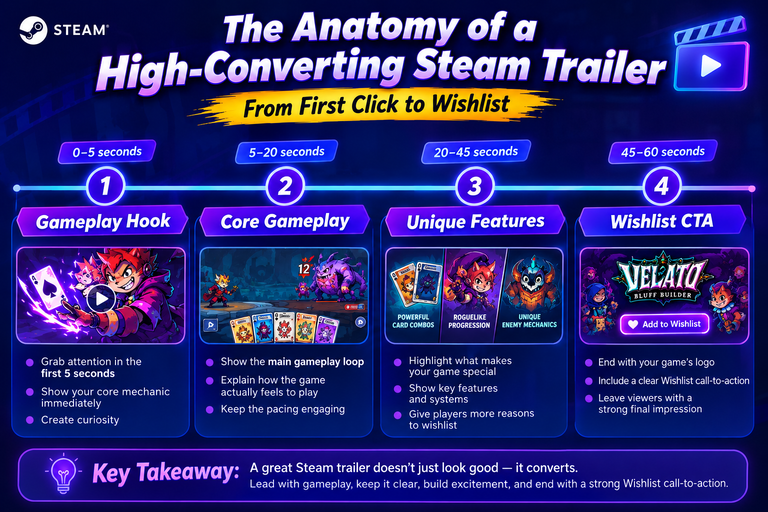
Although every game is different, most successful Steam trailers follow a similar structure.
0–5 seconds
Gameplay Hook

↓

5–20 seconds
Core Gameplay Loop

↓

20–45 seconds
Unique Features

↓

45–75 seconds
Progression & Content

↓

Final 10 seconds
Logo + Wishlist CTA
This structure works because it matches how players evaluate games on Steam.
Start With Gameplay, Not Logos
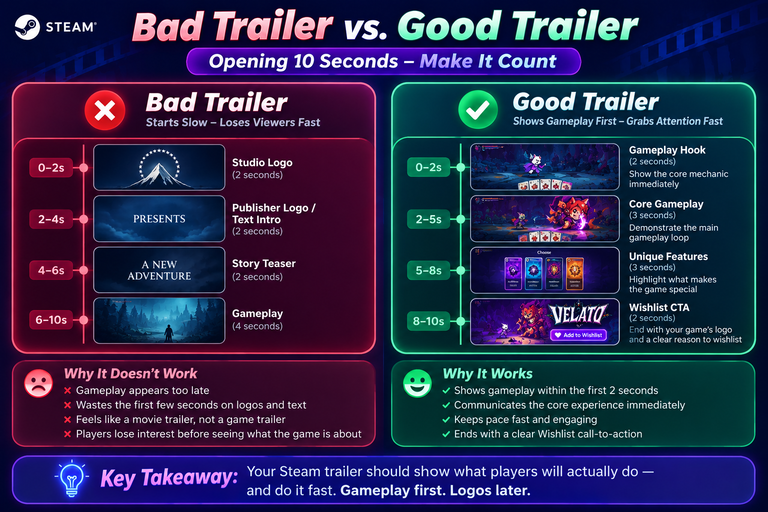
Many indie trailers begin like this:
Studio Logo

↓

Publisher Logo

↓

Engine Logo

↓

Fade to Black

↓

Story Text

↓

Gameplay
By the time gameplay finally appears, many viewers have already stopped watching. Instead, reverse the order. Start immediately with your strongest gameplay moment. Studio and publisher logos can appear briefly at the end if necessary.
Remember: Players visit your Steam page because they’re interested in your game—not your logo animation.
Show the Core Gameplay Loop
The first 20 seconds should communicate exactly what players will spend most of their time doing.
Think of it as your game’s “daily activity.”
For example:
Roguelike Deckbuilder
- Draw cards
- Play cards
- Defeat enemies
- Earn rewards
- Build stronger decks
City Builder
- Construct buildings
- Expand the town
- Manage resources
- Unlock upgrades
Survival Game
- Gather resources
- Craft equipment
- Explore
- Fight enemies
If viewers understand the gameplay loop immediately, they’re much more likely to continue watching.
Case Study: Velato
For Velato, the trailer should establish its identity within seconds.
An effective opening sequence might look like this:
Cards dealt

↓

Player chooses a bluff

↓

Enemy reacts

↓

Poker hand revealed

↓

Power activates

↓

Victory animation
In less than ten seconds, viewers already understand that:
- Cards are central to the gameplay.
- Bluffing matters.
- Strategy influences the outcome.
- The game features roguelike progression.
This is much more effective than beginning with story exposition or character introductions.
Focus on What Makes Your Game Different
Once players understand the basic gameplay loop, show what separates your game from competitors.
Ask yourself:
“If someone only remembers one thing from this trailer, what should it be?”
For Velato, that answer isn’t simply “another deckbuilder.”
It’s the combination of poker mechanics, bluffing, and roguelike progression.
Highlight features that players can’t experience elsewhere.
Examples include:
- Unique combat systems
- Innovative mechanics
- Original art direction
- Procedural generation
- Character customization
- Multiplayer interactions
Lead with your strongest differentiator.
Keep the Camera Moving
Static gameplay footage quickly becomes repetitive.
Instead, create momentum through careful editing.
Alternate between:
- Exploration
- Combat
- Menus
- Boss fights
- Upgrades
- Reward screens
Each clip should introduce something new.
Avoid showing the same action for too long unless it’s particularly satisfying.
Show Real Gameplay
Players can usually tell when footage has been staged or heavily scripted.
Authenticity builds trust.
Whenever possible, capture actual gameplay instead of creating cinematic sequences that don’t represent the player experience.
Avoid:
- Fake UI
- Edited combat outcomes
- Impossible camera angles
- Scripted moments that never occur during normal gameplay
Steam visitors want to know what they’ll actually experience after buying your game.
Keep the User Interface Visible
Some developers hide the UI because they think it looks cleaner.
In most cases, that’s a mistake.
The interface helps players understand:
- Health
- Resources
- Card effects
- Cooldowns
- Inventory
- Progression
A visible UI reinforces that the footage is genuine gameplay.
For strategy games, roguelikes, simulation games, and RPGs, the interface is part of the experience.
Instead of removing it, make sure it’s clean and readable.
Use Editing to Maintain Momentum
Every cut should have a purpose.
Good pacing keeps viewers engaged without becoming overwhelming.
Aim for clips between two and five seconds.
If a mechanic needs more explanation, use a slightly longer sequence—but avoid lingering on repetitive actions.
A simple pacing formula is:
Introduce

↓

Demonstrate

↓

Escalate

↓

Reward
Each segment should naturally lead into the next.
Music Should Support the Gameplay
Music shapes the emotional tone of your trailer.
The soundtrack should complement—not overpower—the gameplay.
For example:
- Fast-paced action games benefit from energetic music with strong rhythm.
- Strategy games often work better with controlled, atmospheric tracks.
- Horror games rely on tension and silence as much as music.
Choose audio that matches the player’s emotional experience.
Avoid tracks that distract from important gameplay moments.
Let Sound Effects Shine
One common mistake is lowering gameplay audio beneath loud background music.
Instead, let players hear:
- Card shuffles
- Weapon impacts
- Spell effects
- Character reactions
- Environmental sounds
These details make gameplay feel tangible and satisfying.
For Velato, the sounds of cards being dealt, chips moving across the table, and successful bluff effects reinforce the fantasy of strategic poker combat.
Showcase Progression
Players don’t just want to know what happens in the first five minutes.
They also want to know what’s waiting later.
Toward the middle of your trailer, introduce signs of progression, such as:
- Stronger abilities
- New enemies
- Additional environments
- Boss encounters
- Unlockable characters
- Rare cards or items
This creates anticipation and demonstrates that the experience evolves over time.
End With a Memorable Finish
The closing moments should reinforce your game’s identity.
A strong ending often includes:
- Your logo.
- A memorable gameplay moment.
- Release information or “Coming Soon.”
- A Wishlist CTA.
Keep it short.
The trailer should finish while viewers are still interested—not after the excitement has faded.
Common Editing Mistakes
Even visually impressive games can lose potential wishlists because of poor editing.
Avoid these mistakes:
- Spending too long on intro animations.
- Using overly long gameplay clips.
- Cutting so quickly that viewers can’t understand what’s happening.
- Showing menus without context.
- Repeating the same mechanic multiple times.
- Using cinematic footage that doesn’t represent gameplay.
- Ending abruptly without reinforcing the game’s identity.
Good editing isn’t about flashy transitions—it’s about clear communication.
Before vs. After
Imagine two versions of the same trailer.
Version A
- 12-second logo animation.
- Story text before gameplay.
- Slow camera movements.
- No visible UI.
- Generic background music.
Result:
Players still don’t understand the game after twenty seconds.
Version B
- Gameplay starts immediately.
- Core mechanic shown in the first five seconds.
- Smooth pacing.
- Visible interface.
- Increasing intensity throughout the trailer.
- Ends with logo and Wishlist CTA.
Result:
Players quickly understand the experience and are far more likely to continue exploring the Store page.
Designing a Trailer for Steam, Not Social Media
One final point is worth emphasizing. A Steam trailer is not a TikTok clip. It isn’t a YouTube documentary. And it isn’t a cinematic reveal trailer shown during a live event.
It exists to support one goal: Increase Store page conversions.
Every editing decision should move viewers one step closer to clicking “Add to Wishlist.”
That means prioritizing clarity, gameplay, pacing, and authenticity over visual spectacle.
If players finish your trailer with a clear understanding of what your game is and why it’s worth playing, you’ve achieved its purpose.
Steam Trailer Checklist Before You Publish
Before publishing your Steam Store page, review your trailer using the checklist below.
Gameplay
- ✅ Gameplay appears within the first 5 seconds.
- ✅ The core gameplay loop is immediately understandable.
- ✅ The trailer shows real gameplay instead of scripted cinematics.
- ✅ The most exciting mechanics appear early.
Editing
- ✅ Fast but readable pacing.
- ✅ No unnecessary fade-to-black transitions.
- ✅ Every clip introduces something new.
- ✅ No repetitive gameplay.
Audio
- ✅ Background music matches the game’s mood.
- ✅ Gameplay sound effects remain audible.
- ✅ Audio levels are balanced.
- ✅ No copyrighted music without proper licensing.
Store Page Optimization
- ✅ Trailer thumbnail looks attractive.
- ✅ Gameplay resolution is high.
- ✅ Frame rate is smooth.
- ✅ Logo appears near the end.
- ✅ Wishlist CTA is visible.
Marketing
Ask five people who have never seen your game:
- What genre is this?
- What makes this game different?
- Would you wishlist it?
- Which moment was most memorable?
- Which part felt confusing?
If several viewers struggle to answer the first two questions, your Steam trailer likely needs revision.
Capturing Gameplay the Right Way
Great editing can’t fix poor gameplay footage. Before recording, prepare a build that showcases your game in its best possible state.
Consider the following:
- Hide debug information.
- Disable FPS counters unless they’re part of the experience.
- Use the highest graphical settings your hardware can record smoothly.
- Capture at 1080p or higher.
- Maintain a stable frame rate throughout the recording.
If your game includes loading screens, long menus, or setup phases, record around them.
The final trailer should highlight exciting gameplay—not waiting.
Capture a Variety of Gameplay
One of the most common mistakes is recording a single play session and using it for the entire trailer.
Instead, record multiple sessions with different objectives.
Capture footage such as:
- Early gameplay
- Mid-game progression
- Late-game abilities
- Boss encounters
- Rare events
- Character upgrades
- Environmental variety
- Victory moments
Having a larger footage library gives you much greater flexibility during editing.
Record With the Player in Mind
Ask yourself:
“If I had never seen this game before, what would I want to know?”
For example:
- A strategy player wants to understand decision-making.
- An action player wants satisfying combat.
- A roguelike fan wants replayability and progression.
- Tailor your footage to answer those expectations.
Steam Deck Considerations
A growing percentage of Steam users play on Steam Deck.
If your game is verified or playable on the device, include footage that demonstrates:
- Controller navigation
- Readable interface
- Stable performance
- Comfortable gameplay on a smaller screen
This reassures potential buyers that your game offers a good experience beyond desktop PCs.
Recommended Video Editing Tools
Creating a professional trailer doesn’t necessarily require expensive software.
Here are several tools commonly used by indie developers.
| Tool | Best For | Pricing |
|---|---|---|
| DaVinci Resolve | Professional editing & color grading | Free / Studio |
| Adobe Premiere Pro | Industry-standard video editing | Subscription |
| Final Cut Pro | macOS creators | One-time purchase |
| CapCut Desktop | Quick edits & social media content | Free / Premium |
| Shotcut | Open-source editing | Free |
| OBS Studio | Gameplay recording | Free |
For most solo developers, a combination of OBS Studio and DaVinci Resolve provides an excellent balance of quality and cost.
Creating a Steam Trailer Thumbnail
Steam automatically displays a thumbnail for your trailer. Don’t overlook it. A compelling thumbnail encourages visitors to press play.
A good thumbnail should include:
- One strong gameplay scene.
- High contrast.
- Clear composition.
- Minimal text.
- Readable logo if appropriate.
Avoid blurry frames or menu screens. Treat the thumbnail like a miniature capsule art.
Optimizing Steam Trailer Length
There’s no single perfect duration, but most successful Steam trailers fall between 60 and 90 seconds.
As a general guideline:
- 30–45 seconds: Fast-paced arcade games or mobile-style experiences.
- 60–90 seconds: Most indie games.
- 90–120 seconds: Complex strategy, simulation, or RPG titles.
Longer isn’t necessarily better.
It’s more effective to leave viewers wanting more than to repeat similar gameplay.
Case Study: Lessons from Successful Steam Trailers
Many successful indie games follow surprisingly similar principles in their Steam trailers.
Balatro
Balatro introduces gameplay almost immediately. Within seconds, viewers understand that the game revolves around poker hands, deckbuilding, and scoring multipliers. The pacing remains brisk, with each scene introducing a new mechanic or escalating the challenge.
Key takeaway: Show the core mechanic first and build excitement through progression.
Hades
The Hades trailer emphasizes fluid combat, fast movement, and stylish visual effects. Dialogue and story elements are present but never interrupt the action for long.
Key takeaway: Let gameplay lead, while using narrative to add personality rather than replace action.
Slay the Spire
Rather than relying on flashy effects, Slay the Spire clearly demonstrates deckbuilding, card synergies, and combat decisions. Every clip reinforces the game’s strategic depth.
Key takeaway: Clarity beats spectacle, especially for strategy games.
Velato
For Velato, the strongest trailer would highlight what makes it different from other roguelike deckbuilders.
A recommended flow could be:
- Open with cards being dealt and a bluff decision.
- Reveal how poker hands trigger powerful abilities.
- Showcase different enemy encounters and character interactions.
- Demonstrate progression through new cards, relics, or upgrades.
- End with the Velato logo and a clear Wishlist call-to-action.
This structure communicates the game’s unique identity while keeping the focus firmly on gameplay.
FAQ
How many trailers should I upload to Steam?
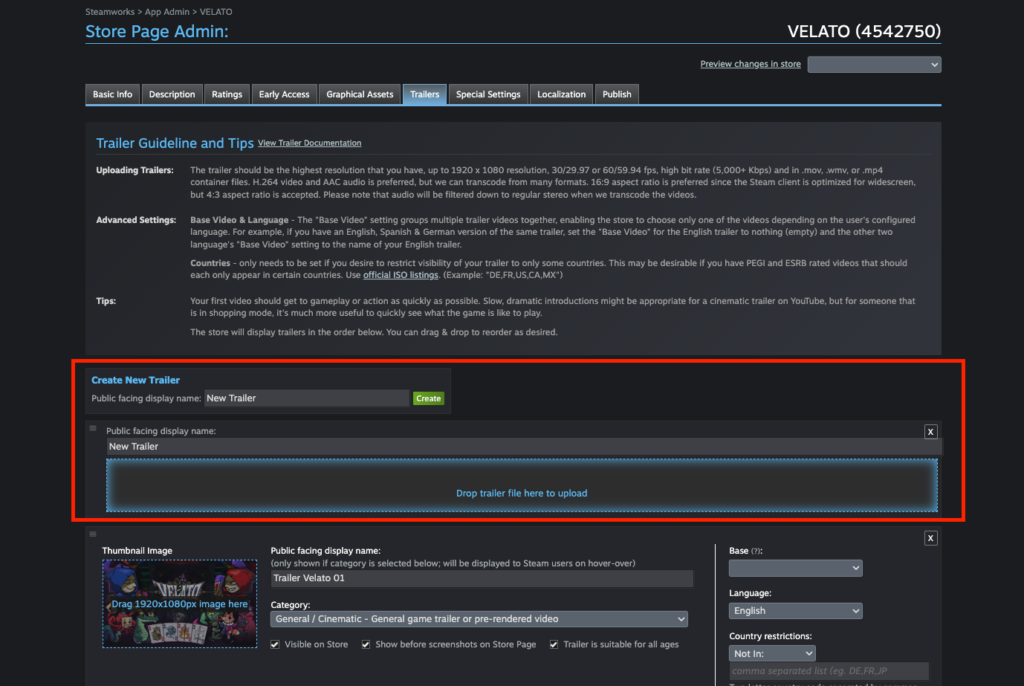
Steam allows multiple videos, but the first trailer is the most important because it autoplays for many visitors.
Lead with your strongest gameplay-focused trailer.
Additional videos can cover topics such as:
- Story
- Multiplayer
- Major updates
- DLC
- Behind-the-scenes development
Should I include voice-over narration?
Usually, no.
Most Steam trailers communicate through gameplay, editing, and music.
Voice-over can slow the pacing unless it adds meaningful context.
Should I show menus?
Only if they help explain gameplay.
Avoid spending several seconds navigating inventory screens unless those interfaces are a key part of the experience.
Can I reuse my launch trailer on YouTube?
Yes, but consider creating different versions.
A Steam trailer should prioritize gameplay and conversion, while a YouTube trailer can spend more time on storytelling or community engagement.
Final Thoughts
A great Steam trailer doesn’t need a Hollywood budget. It needs clarity.
Players visit your Steam page because they’re evaluating whether your game deserves their attention. Your trailer should respect that by showing authentic gameplay, communicating the core gameplay loop quickly, and highlighting what makes your game unique.
For indie developers and solo developers, a well-made trailer can become one of the most valuable marketing assets on your Steam page. Combined with strong capsule art, accurate Steam tags, and a polished Store page, it can significantly improve your wishlist conversion rate.
Using Velato as an example, we’ve seen how focusing on poker mechanics, bluffing systems, and roguelike progression creates a compelling gameplay narrative without relying on lengthy cinematic introductions. The same principle applies to almost every indie game: show what players will actually do, and show it well.
Remember that your trailer isn’t just a video—it’s a promise. Make sure the experience it presents matches the game players will ultimately receive.
Related Posts:
Continue building your Steam marketing content cluster with links to:
- How to Set Up a Store Page on Steam
- Steam Tags Explained: How to Choose the Best Tags for Your Indie Game
- Steam Capsule Art Guide: Design Tips That Increase Click-Through Rate
- What Is an Indie Game?
- Velato: A Poker Roguelike Worth Watching
References
Official Steamworks Documentation
- Store Page Documentation
https://partner.steamgames.com/doc/store - Store Graphical Assets & Media
https://partner.steamgames.com/doc/store/assets - Steamworks Video & Trailer Guidelines
https://partner.steamgames.com/doc/store/trailer
Additional Resources
- Steamworks YouTube Channel (developer presentations)
- GameDiscoverCo – https://newsletter.gamediscover.co/
- SteamDB – https://steamdb.info/