
How to Participate and Maximize Your Wishlists
For most indie developers, launching a game successfully isn’t just about building a great product—it’s about making sure players discover it.
Every year, thousands of new games are released on Steam. Even polished projects can struggle to gain attention if they don’t have enough wishlists before launch. That’s why Steam Next Fest has become one of the most important marketing opportunities for indie studios and solo developers.
Unlike seasonal Steam sales, Steam Next Fest focuses entirely on unreleased games. Players browse upcoming titles, download demos, watch developer livestreams, and decide which games deserve a place on their wishlist. For many successful indie games, the festival becomes the moment they transition from being largely unknown to appearing on thousands of players’ radar.
However, participating in Fests is not simply a matter of clicking the registration button. Developers who achieve the best results often spend months preparing their Steam Store page, refining their demo, polishing their trailer, and coordinating their marketing efforts before the event begins.
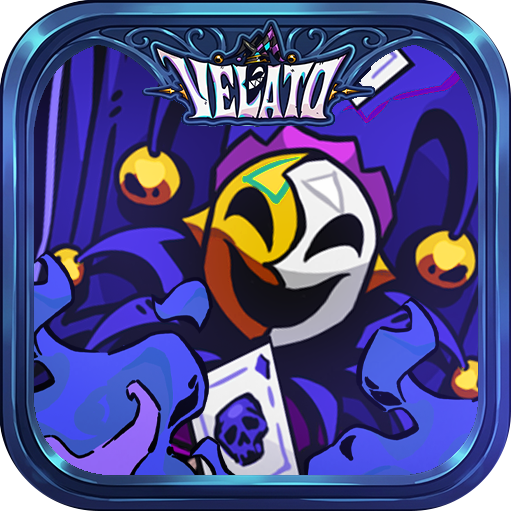
This guide explains everything you need to know about Steam Next Fest, from eligibility requirements and preparation timelines to wishlist strategies and post-event optimization. Throughout the article, we’ll also use Velato, an upcoming poker roguelike, as an example of how an indie team can prepare for a successful festival.
Table of Contents
- What Is Steam Next Fest?
- Why Steam Next Fest Matters
- Who Can Participate?
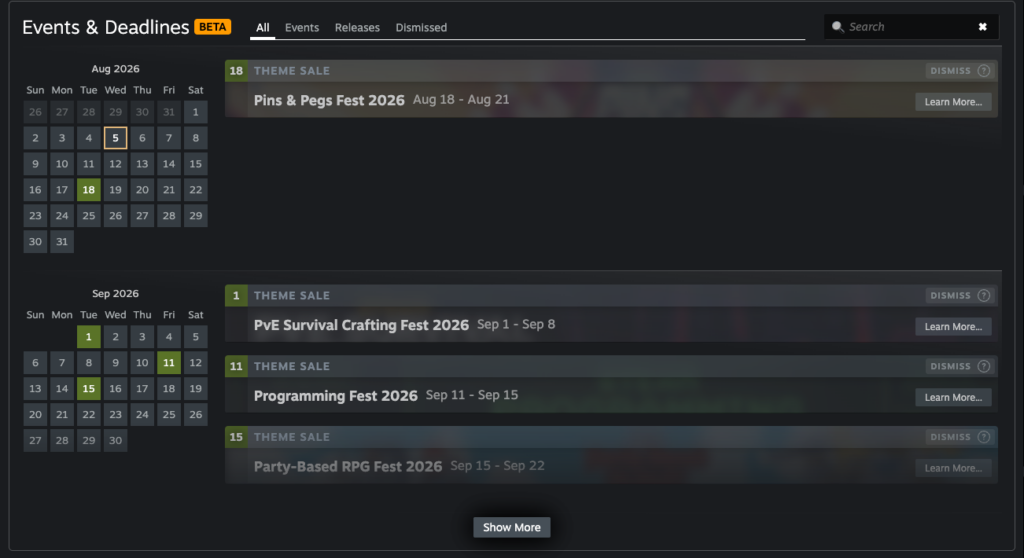
- When Should You Join Steam Next Fest?
- Preparing Your Steam Store Page
- Creating a Demo That Converts
- Marketing Before Steam Next Fest
- What to Do During the Festival
- Measuring Success
- Steam Next Fest Checklist
- Frequently Asked Questions
What Is Steam Next Fest?
Steam Next Fest is Valve’s official digital festival for upcoming games. During the event, participating developers release public demos that players can download for free while exploring hundreds of upcoming titles.
Unlike a traditional game sale, the goal of Steam Next Fest isn’t immediate revenue—it’s discovery.
The festival helps players:
- Find upcoming indie games.
- Try playable demos.
- Watch developer livestreams.
- Learn about new genres.
- Add games to their Steam wishlists.
For developers, the event creates one of the largest opportunities of the year to introduce an unreleased game to a highly engaged audience.
Valve regularly features participating games throughout Steam, giving players multiple ways to discover them through event pages, personalized recommendations, and genre-specific collections.
Why It Matters for Indie Devs?
Many indie developers have limited marketing budgets.
Running paid advertising campaigns can be expensive, while building an audience organically often takes years.
Steam Next Fest offers something different.
Instead of paying for visibility, developers can leverage the festival’s built-in audience to generate awareness and gather feedback before launch.
Some of the biggest benefits include:
- Increased Steam Store page traffic.
- Higher demo download numbers.
- More Steam wishlists.
- Valuable player feedback.
- Exposure to streamers and content creators.
- Coverage from gaming media.
- Stronger launch-day momentum.
For solo developers and small studios, this exposure can have a significant impact on the commercial success of a game.
How It Fits Into Your Marketing Strategy?
Think of Steam Next Fest as the centerpiece of your pre-launch marketing campaign rather than a standalone event.
Your marketing should begin months before the festival and continue after it ends.
A simplified player journey looks like this:
Steam Discovery

↓

Steam Next Fest

↓

Demo Download

↓

Steam Wishlist

↓

Game Launch

↓

Purchase
Every stage influences the next.
A compelling demo encourages wishlists.
More wishlists increase launch visibility.
Higher launch visibility generates more sales.
Who Can Participate in Steam Next Fest?
Before registering, you need to confirm that your project meets Valve’s eligibility requirements.
Generally, your game should:
- Be unreleased.
- Have a public Steam Store page.
- Offer a playable public demo.
- Be associated with a Steamworks account in good standing.
- Participate in Steam Next Fest only once.
Because each title only gets one opportunity to participate, choosing the right edition of Fest is an important strategic decision.
Launching too early with an unfinished demo may reduce your chances of making a strong impression, while waiting too long can leave little time to benefit from player feedback.
When Is the Best Time to Join?
There isn’t a universal answer.
The best timing depends on how close your game is to launch.
Joining Too Early
Advantages:
- Early community feedback.
- More opportunities to improve the game.
- Longer wishlist growth period.
Challenges:
- Players may forget the game before release.
- Your demo might not reflect the final quality.
- Additional development time may be required after the festival.
Joining Close to Launch
Advantages:
- Players remember the game more clearly.
- Wishlist momentum carries into release.
- Marketing efforts become more concentrated.
Challenges:
- Less time to react to feedback.
- Limited opportunity to redesign systems based on player comments.
For most indie developers, participating approximately three to six months before launch provides a good balance between visibility and development flexibility.
Build a Preparation Timeline
Successful developers rarely prepare for Steam Next Fest at the last minute.
Instead, they work backwards from the event date.
A practical timeline might look like this:
6 Months Before

↓

Steam Store Page

↓

Capsule Art

↓

Gameplay Trailer

↓

Playable Demo

↓

Quality Assurance

↓

Wishlist Campaign

↓

Steam Next Fest

↓

Launch
Following a structured schedule helps reduce last-minute stress and ensures that every asset is ready before the festival begins.
Prepare Your Steam Store Page Before Registering
Your Steam Store page is where players decide whether to wishlist your game.
Before participating in Steam Fest, make sure your Store page includes:
- Professional capsule art.
- High-quality gameplay screenshots.
- A polished gameplay trailer.
- Accurate Steam tags.
- A compelling Store description.
- Complete system requirements.
- Supported languages.
- Consistent branding.
Every element should communicate the same message about your game.
For example, if your game is a poker roguelike, that identity should be reflected in the capsule art, screenshots, trailer, Store description, and tags.
Case Study: Preparing Velato for Steam Fest
Imagine the team behind Velato is planning to participate in the October edition of Steam Next Fest.
Six months before the festival, they publish a polished Steam Store page featuring updated capsule art, gameplay screenshots, and a trailer highlighting Velato’s unique bluffing mechanics.
Three months later, they release a carefully curated demo that introduces players to the game’s core loop without revealing too much content.
Instead of rushing to finish marketing assets during the event, the team can focus on interacting with players, collecting feedback, fixing issues, and encouraging wishlist growth.
This preparation allows the developers to spend the festival engaging with the community rather than scrambling to finish unfinished work.
Preparing for Steam Next Fest: Your 30-Day Action Plan
Once you’ve registered for Steam Next Fest, the real work begins.
Many developers assume that participating in Fest is enough to generate wishlists. In reality, the games that perform best are usually those that spend weeks polishing their demo, refining their Steam Store page, and building awareness before the festival begins.
Think of Steam Fest as your game’s biggest public playtest. Every visitor, streamer, and journalist will judge your game based on what they experience during that week.
The better prepared you are, the more value you’ll get from every impression.
Checklist #1: Polish Your Steam Demo
Your demo is the centerpiece of your Steam Next Fest campaign.
Players aren’t downloading your demo because they’re already fans—they’re downloading it to decide whether your game deserves a place on their wishlist.
A weak demo rarely gets a second chance.
Instead of showcasing every mechanic, focus on delivering the strongest possible first impression.
An effective Steam Next Fest demo should:
- Introduce the core gameplay within the first few minutes.
- End before the experience becomes repetitive.
- Leave players wanting more.
- Highlight your game’s unique mechanics.
- Run smoothly without major bugs.
For most indie games, a demo lasting 20–40 minutes is an ideal target. It’s long enough for players to understand the gameplay loop but short enough to maintain momentum.
Checklist #2: Showcase Your Core Gameplay Immediately
One of the biggest mistakes developers make during Steam Next Fest is delaying the fun.
Players browsing hundreds of demos have limited patience.
Avoid spending the first ten minutes on:
- Lengthy tutorials.
- Slow introductions.
- Unskippable cutscenes.
- Excessive dialogue.
- Complex menus.
Instead, let players experience your core mechanic as quickly as possible.
If your game revolves around tactical combat, let them fight.
If it’s a city builder, let them build.
If it’s a poker roguelike like Velato, players should be making meaningful poker decisions almost immediately.
A strong opening dramatically increases the chances that players will continue playing—and eventually wishlist your game.
Checklist #3: Optimize Performance Before the Festival
Nothing damages first impressions faster than technical problems.
Before Steam Next Fest, thoroughly test your demo across different hardware configurations.
Pay particular attention to:
- Loading times.
- Frame rate stability.
- Memory usage.
- Controller compatibility.
- Resolution scaling.
- Ultrawide monitor support.
- Steam Deck compatibility, if applicable.
Technical polish communicates professionalism.
Even small performance improvements can positively influence reviews, livestreams, and word-of-mouth recommendations.
Checklist #4: Improve Your Steam Store Page
Every demo download eventually leads players back to your Steam Store page.
That’s where they decide whether to wishlist your game.
Before Steam Next Fest, review every section of your page.
Ask yourself:
- Does the capsule art clearly communicate the genre?
- Is the trailer up to date?
- Do the screenshots reflect the current version?
- Are the Steam tags accurate?
- Does the description explain the gameplay quickly?
Your Store page should tell the same story as your demo.
Consistency builds trust.
Checklist #5: Update Your Trailer
Many developers create a trailer months before Steam Next Fest and never revisit it.
If your game has improved significantly, your trailer should reflect those changes.
A high-converting Steam trailer should:
- Start with gameplay in the first five seconds.
- Clearly communicate the gameplay loop.
- Highlight unique mechanics.
- Maintain a fast pace.
- End with a strong wishlist message.
Avoid cinematic intros that delay the action.
Players visiting your Store page after trying the demo already want gameplay—not another teaser.
Checklist #6: Refresh Your Screenshots
Screenshots should reinforce what players experienced in the demo.
Replace outdated images with ones that showcase:
- Updated visuals.
- New environments.
- Character progression.
- Combat.
- User interface.
- Boss encounters.
- Signature mechanics.
Every screenshot should answer the question:
“Why is this game worth playing?”
Checklist #7: Double-Check Your Steam Tags
Steam tags influence discoverability throughout Steam Next Fest.
Review your tags before the festival begins.
Your primary tags should accurately describe your game’s identity.
For Velato, examples might include:
- Roguelike
- Deckbuilder
- Card Battler
- Strategy
- Fantasy
Avoid adding trending tags simply to attract more impressions.
Relevant traffic converts far better than broad, unfocused visibility.
Checklist #8: Prepare a Press Kit
Steam Next Fest attracts journalists, YouTubers, Twitch streamers, and content creators looking for interesting games to cover.
Make their job easy.
Prepare a downloadable press kit containing:
- Game logo.
- Capsule art.
- Key artwork.
- Screenshots.
- Trailer.
- Short description.
- Long description.
- Developer biography.
- Contact information.
A professional press kit increases the likelihood that creators will feature your game.
Checklist #9: Reach Out to Content Creators Early
Don’t wait until Steam Next Fest begins to contact creators.
Build a list of:
- YouTubers.
- Twitch streamers.
- TikTok creators.
- Gaming journalists.
- Newsletter writers.
Send personalized emails several weeks before the festival.
Include:
- A brief introduction.
- Why your game fits their audience.
- Steam page link.
- Demo availability.
- Press kit.
Avoid mass emails.
A thoughtful message is far more effective than sending hundreds of identical pitches.
Checklist #10: Build Community Momentum
Steam Next Fest shouldn’t be the first time people hear about your game.
Use the weeks leading up to the event to build anticipation.
Share:
- GIFs.
- Gameplay clips.
- Developer diaries.
- Behind-the-scenes content.
- Feature reveals.
- Demo countdowns.
Platforms worth prioritizing include:
- X (formerly Twitter)
- Bluesky
- Discord
- YouTube Shorts
- TikTok
- LinkedIn (for industry visibility)
The goal is to encourage players to visit your Steam Store page as soon as the festival begins.
Checklist #11: Plan Your Developer Livestream
Steam allows participating developers to broadcast gameplay during Steam Next Fest.
A livestream doesn’t need expensive production equipment.
What matters is authenticity.
Consider demonstrating:
- A complete gameplay run.
- Advanced strategies.
- New mechanics.
- Developer commentary.
- Community Q&A.
Watching developers explain design decisions often creates a stronger connection with potential players.
Checklist #12: Monitor Analytics Daily
Once Steam Next Fest begins, check your Steamworks analytics regularly.
Track metrics such as:
- Store page visits.
- Demo downloads.
- Wishlist growth.
- Conversion rate.
- Traffic sources.
- Geographic distribution.
If you notice unexpected spikes, investigate where the traffic originated.
You may discover coverage from a creator or news outlet that you can amplify through your own channels.
30-Day Steam Next Fest Preparation Timeline
30 Days Before
↓
Finalize Demo
↓
QA & Bug Fixes
↓
Update Steam Store Page
↓
Upload New Trailer
↓
Refresh Screenshots
↓
Review Steam Tags
↓
Prepare Press Kit
↓
Contact Creators
↓
Announce Demo
↓
Steam Next Fest Begins
Following a structured schedule reduces last-minute stress and ensures every major marketing asset is ready before players arrive.
Case Study: Preparing Velato for Steam Next Fest
Imagine the Velato team has one month before Steam Next Fest.
Instead of adding entirely new features, they focus on refinement.
The demo is shortened to around 30 minutes, ensuring players quickly experience the game’s bluffing mechanics and roguelike progression. The Store page is updated with fresh screenshots that better showcase combat, while the trailer is re-edited to feature gameplay within the opening seconds.
At the same time, the team prepares a press kit, schedules creator outreach, and announces the upcoming demo across social media and Discord.
By the time Steam Next Fest begins, every player touchpoint—from the first Store page impression to the final demo screen—delivers a consistent message about what makes Velato unique.
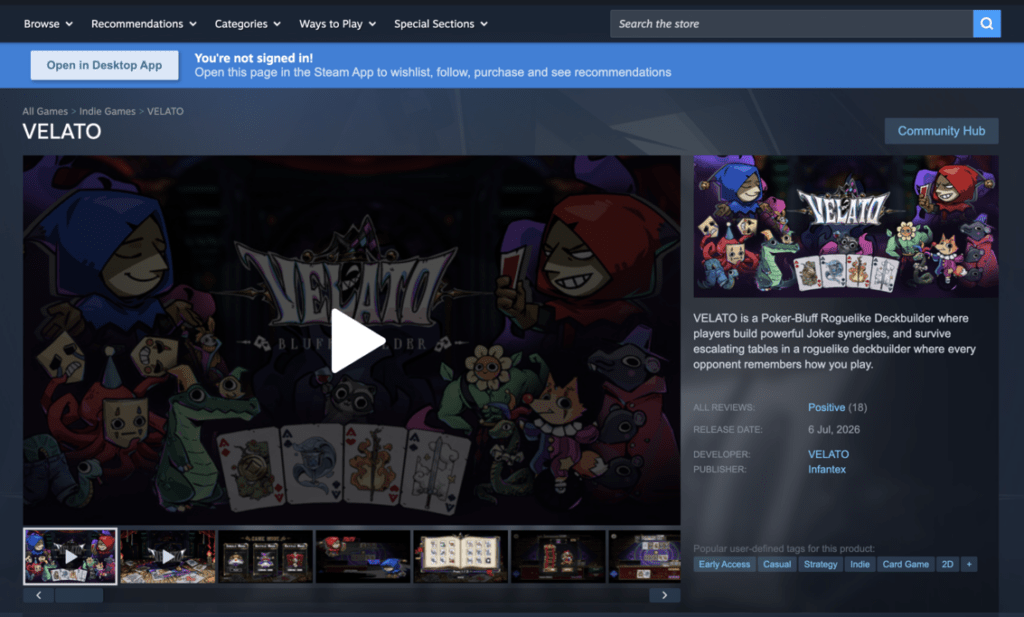
Velato Steam Page: https://store.steampowered.com/app/4542750/VELATO/
Winning Steam Next Fest: What to Do During and After the Event
Your preparation doesn’t end when Steam Next Fest begins.
In many ways, the festival itself is only the halfway point. The developers who generate the most value from Steam Next Fest continue marketing their game throughout the event, respond quickly to player feedback, and maintain momentum after the festival ends.
Think of Steam Next Fest as the beginning of your launch campaign—not the finish line.
Checklist #13: Make the First 48 Hours Count
The first two days of Steam Next Fest are often the busiest.
Many players spend the opening weekend browsing new demos, while streamers and gaming media search for interesting titles to feature.
During this period, you should:
- Monitor your Steamworks analytics frequently.
- Watch community discussions.
- Respond to bug reports.
- Share gameplay clips on social media.
- Thank creators covering your game.
- Fix critical issues as quickly as possible.
A responsive developer leaves a positive impression and encourages players to continue following the project.
Checklist #14: Engage With Your Community
One advantage of Steam Next Fest is the opportunity to interact directly with players before launch.
Monitor channels such as:
- Steam Discussions
- Discord
- X (formerly Twitter)
- Bluesky
- YouTube comments
Players often provide valuable insights about:
- Difficulty balance.
- User interface.
- Performance.
- Controls.
- Tutorial clarity.
- Missing quality-of-life features.
Not every suggestion should be implemented, but recurring feedback deserves attention.
Checklist #15: Release Small Updates During the Festival
You don’t need to introduce major content updates during Steam Next Fest.
Instead, focus on stability.
Useful improvements include:
- Bug fixes.
- Performance optimizations.
- Controller improvements.
- Localization corrections.
- UI refinements.
- Crash fixes.
Publishing small updates demonstrates that your project is actively maintained.
If you release an update, let players know through a Steam announcement or community post so they understand their feedback is being acted upon.
Checklist #16: Continue Sharing Content Every Day
Many developers become quiet after Steam Next Fest starts.
Don’t disappear.
Maintain visibility throughout the week by sharing:
- Funny gameplay moments.
- Community clips.
- Speedruns.
- Fan reactions.
- Behind-the-scenes development.
- Developer tips.
- New screenshots.
Each post creates another opportunity for players to discover your game.
Checklist #17: Encourage Streamers and Content Creators
Content creators can significantly expand your reach during Steam Next Fest.
When someone covers your game:
- Share their video.
- Thank them publicly.
- Join the chat respectfully if they’re livestreaming.
- Avoid pressuring them for positive feedback.
Authentic creator coverage often generates far more trust than traditional advertising.
Checklist #18: Monitor Your Wishlist Growth
Wishlists are one of the most valuable outcomes of Steam Next Fest.
Instead of focusing only on total numbers, pay attention to trends.
Ask questions like:
- Which day generated the most wishlists?
- Did a creator’s video cause a spike?
- Which countries produced the most interest?
- Which marketing channel converted best?
- Did updates improve conversion?
Understanding these patterns will help you plan future campaigns more effectively.
Checklist #19: Analyze Player Behavior
Numbers alone don’t tell the full story.
Watch how players interact with your demo.
Look for signs such as:
- Where players stop playing.
- Which mechanics create confusion.
- Which bosses feel too difficult.
- Whether players understand the core gameplay loop.
- How long the average play session lasts.
These insights can be just as valuable as wishlist growth.
Checklist #20: Plan for the End of Steam Next Fest
When Steam Next Fest ends, don’t assume the marketing opportunity is over.
Instead, transition smoothly into your next phase.
You might:
- Publish a recap article.
- Thank the community.
- Share milestone statistics.
- Continue improving the demo.
- Announce upcoming features.
- Reveal your launch window if appropriate.
Keeping the conversation going helps retain the audience you’ve just built.
A 7-Day Steam Next Fest Marketing Plan
A simple daily schedule can help you stay active without feeling overwhelmed.
| Day | Focus |
|---|---|
| Day 1 | Announce your participation, share your trailer, and encourage demo downloads. |
| Day 2 | Host a developer livestream and answer community questions. |
| Day 3 | Release a bug-fix update and publish patch notes. |
| Day 4 | Highlight streamer or YouTube coverage of your game. |
| Day 5 | Share community screenshots, clips, or fan feedback. |
| Day 6 | Post a development insight or behind-the-scenes article. |
| Day 7 | Thank players, remind them to wishlist the game, and outline what’s coming next. |
Consistency matters more than posting constantly.
Steam Next Fest Success Funnel
Steam Homepage

↓

Steam Next Fest

↓

Steam Store Page

↓

Demo Download

↓

Wishlist

↓

Community Engagement

↓

Game Launch

↓

Purchase

↓

Player Review
Every stage should encourage players to continue to the next.
Case Study: Velato’s Steam Next Fest Strategy
Imagine Velato enters Steam Next Fest with a polished demo and an optimized Steam Store page.
During the first day, the team announces the event across social media and Discord while several creators begin streaming the demo.
By the third day, players report that one encounter feels too difficult. Instead of waiting until after the festival, the developers release a balance update and explain the changes in a Steam news post.
Later in the week, they highlight community gameplay clips and share statistics such as the most frequently played poker hands or the most challenging enemy encounters.
After Steam Next Fest concludes, the team publishes a recap thanking players for their feedback, summarizes the improvements planned before launch, and continues posting development updates.
Rather than treating the festival as a one-time event, Velato uses it as the foundation for a stronger launch campaign.
The Ultimate Steam Next Fest Checklist
Before Registration
- Steamworks account in good standing.
- Steam Store page published.
- Capsule art completed.
- Trailer uploaded.
- Screenshots updated.
- Steam tags reviewed.
- Store description finalized.
- System requirements completed.
Demo Preparation
- Core gameplay introduced quickly.
- Demo length tested.
- Performance optimized.
- Controller support verified.
- Major bugs fixed.
- Tutorial refined.
- Save system tested.
- Demo ending encourages wishlisting.
Marketing Preparation
- Press kit created.
- Creator outreach completed.
- Social media schedule prepared.
- Discord announcement ready.
- Steam announcement drafted.
- Livestream scheduled.
- FAQ prepared.
- Community moderators briefed.
During Steam Next Fest
- Monitor analytics daily.
- Respond to player feedback.
- Fix critical bugs quickly.
- Publish updates.
- Share creator coverage.
- Engage with the community.
- Track wishlist growth.
- Thank players.
After The Fest
- Analyze analytics.
- Review player feedback.
- Prioritize improvements.
- Update the roadmap.
- Publish a recap.
- Continue marketing.
- Prepare for launch.
- Maintain community engagement.
Common Mistakes
Even experienced developers can reduce their results by making avoidable mistakes.
Watch out for these common issues:
- Registering before your demo is ready.
- Launching with outdated screenshots or trailers.
- Choosing inaccurate Steam tags.
- Ignoring community feedback.
- Failing to optimize performance.
- Waiting until the festival starts to contact creators.
- Neglecting Steam announcements.
- Overpromising features that aren’t in the demo.
- Disappearing after the event ends.
- Treating Steam Next Fest as your only marketing effort instead of one milestone in a larger campaign.
Frequently Asked Questions
Can my game participate in Steam Next Fest more than once?
No. Valve currently allows each game to participate in Steam Next Fest only once, making it important to choose the edition that best aligns with your development schedule.
Do I need a public demo?
Yes. A playable public demo is a core requirement for participating in Steam Next Fest.
Can I update my demo during Steam Next Fest?
Yes. Developers can publish bug fixes, balance changes, and other improvements while the festival is running. However, avoid introducing major new systems unless necessary.
Should I remove my demo after Steam Next Fest?
It depends on your marketing strategy.
Some developers keep their demo available to continue attracting wishlists, while others remove it to focus attention on the full release.
Choose the approach that best supports your launch plans.
Is Steam Next Fest useful for solo developers?
Absolutely.
Many solo developers have used Steam Next Fest to gain visibility, collect valuable feedback, and build a strong wishlist base before launch.
Preparation and presentation matter far more than team size.
Final Thoughts
Steam Next Fest is one of the most valuable opportunities available to indie developers before launch—but success isn’t determined by participation alone.
The strongest results come from careful preparation, a polished demo, a compelling Steam Store page, consistent communication, and a willingness to learn from player feedback.
Throughout this guide, we’ve used Velato as an example of how an indie team can prepare for Steam Next Fest. By aligning its demo, trailer, screenshots, branding, and community engagement around a clear identity, the team can maximize both discoverability and wishlist growth during the event.
Remember that Steam Next Fest is not the destination—it’s a catalyst. The players you reach during the festival can become your earliest supporters, your most valuable testers, and your strongest advocates when your game finally launches.
Treat every demo download as the beginning of a relationship, not just another statistic.
Related Posts
- Steam Page SEO Checklist: 50 Proven Ways to Optimize Your Store Page
- How to Set Up a Store Page on Steam
- Steam Tags Explained: How to Choose the Best Tags for Your Indie Game
- Steam Capsule Art Guide: Design Tips That Increase Click-Through Rate
- Steam Trailer Best Practices: Create Trailers That Turn Views Into Wishlists
- What Is an Indie Game?
- Velato: A Poker Roguelike Worth Watching
- How to Create a Steam Demo
References
Steamworks Documentation – Steam Next Fest
https://partner.steamgames.com/doc/marketing/upcoming_events/nextfest
Steamworks Documentation – Store Presence
https://partner.steamgames.com/doc/store
Steamworks Documentation – Demo Setup
https://partner.steamgames.com/doc/store/application/demos
Steamworks Documentation – Visibility & Marketing
https://partner.steamgames.com/doc/marketing/visibility
SteamDB
https://steamdb.info/
GameDiscoverCo
https://newsletter.gamediscover.co/
HowToMarketAGame
https://howtomarketagame.com/