

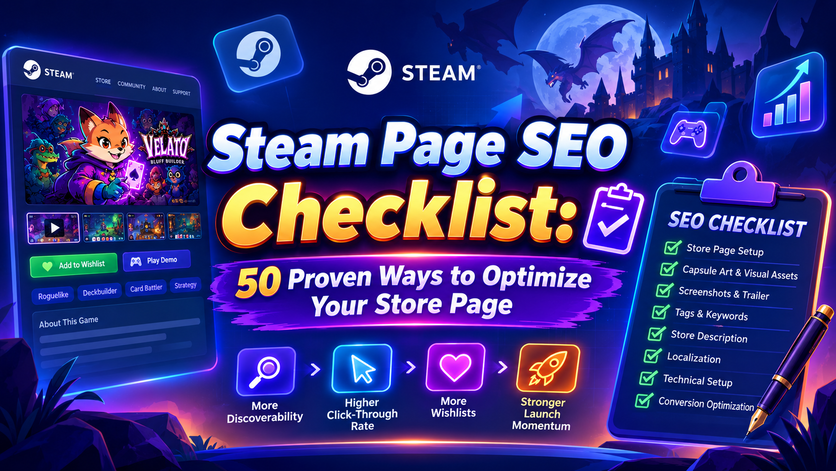
The Ultimate Guide for Indie Developers
Publishing your game on Steam isn’t enough anymore.
With more than 20,000 new games released annually, every indie developer competes for attention in one of the world’s most crowded digital marketplaces. A great game can still struggle if players never discover it—or if they visit your Store page but leave without adding it to their wishlist.
That’s where Steam Page SEO comes in.
Unlike traditional SEO for Google, Steam SEO is about optimizing every element of your Steam Store page so that both Steam’s recommendation systems and potential players understand exactly what your game offers. Your capsule art, tags, trailer, screenshots, description, and overall presentation all work together to improve discoverability and conversion.
Think of your Steam page as your game’s storefront. Every visitor decides within seconds whether to keep scrolling or click “Add to Wishlist.”
In this guide, you’ll learn a practical 50-point Steam Page SEO Checklist covering everything from branding and Store assets to trailers, tags, localization, and conversion optimization. We’ll also use Velato, a poker roguelike, as a real-world example throughout the article.
Table of Contents
- What Is Steam Page SEO?
- Why Steam SEO Matters
- How Steam Discovery Works
- Before You Publish Your Steam Page
- Branding & Visual Assets
- Steam Tags & Search Optimization
- Store Description Best Practices
- Conversion Optimization
- The 50-Point Steam Page SEO Checklist
What Is Steam Page SEO?
Steam Page SEO is the process of optimizing your Steam Store page to improve two key outcomes:
- Help the Steam platform understand what your game is.
- Convince players to wishlist or purchase your game.
Unlike Google, Steam doesn’t rank pages primarily through backlinks or domain authority.
Instead, discoverability depends on a combination of:
- Store assets
- Player behavior
- Tags
- Wishlist activity
- Click-through rate (CTR)
- User engagement
- Sales performance
- Relevance to player interests
Your goal isn’t simply to rank higher in search results.
It’s to maximize the number of players who discover your game—and persuade them to take action.
Why Steam SEO Matters More Than Ever?
Steam has become increasingly competitive.
Every week, hundreds of new titles launch across virtually every genre. Without a strong Store page, even a polished game can disappear among the constant stream of new releases.
A well-optimized Steam page helps you:
- Improve discoverability within Steam.
- Increase click-through rates from search results.
- Convert visitors into wishlists.
- Support Steam’s recommendation systems.
- Improve launch-day momentum.
For indie developers with limited marketing budgets, optimizing your Store page often provides one of the highest returns on investment.
Understanding Steam’s Discovery System
Steam doesn’t rely on a single ranking algorithm. Instead, it combines multiple discovery systems to recommend games to players.
These include:
- Steam Search
- Discovery Queue
- Similar Games recommendations
- Tag pages
- Popular Upcoming
- Featured & Recommended
- Curator recommendations
- Personalized suggestions
Each system uses slightly different signals, but all benefit from a clear, consistent Store page.
Steam SEO vs Google SEO
Although both involve optimization, their goals are different.
| Google SEO | Steam SEO |
|---|---|
| Keywords | Tags + metadata |
| Backlinks | Wishlists & engagement |
| Search rankings | Discoverability |
| Page authority | Player behavior |
| Content depth | Conversion quality |
Traditional SEO attracts visitors from search engines.
Steam SEO helps your game perform better inside Steam itself.
The two complement each other, especially if you maintain a developer website or blog alongside your Steam page.
The Steam Wishlist Funnel
Every successful Store page guides players through a simple journey.
Discovery

↓

Capsule Art

↓

Store Page Click

↓

Trailer

↓

Screenshots

↓

Description

↓

Wishlist

↓

Purchase
Every stage influences the next.
A weak trailer can reduce wishlist conversion, even if your capsule art generates plenty of clicks.
Likewise, excellent screenshots can’t compensate for misleading tags.
Optimizing the entire funnel is more effective than focusing on a single element.
Before You Publish Your Steam Store Page
Before thinking about trailers or marketing campaigns, make sure your Store page includes the essentials.
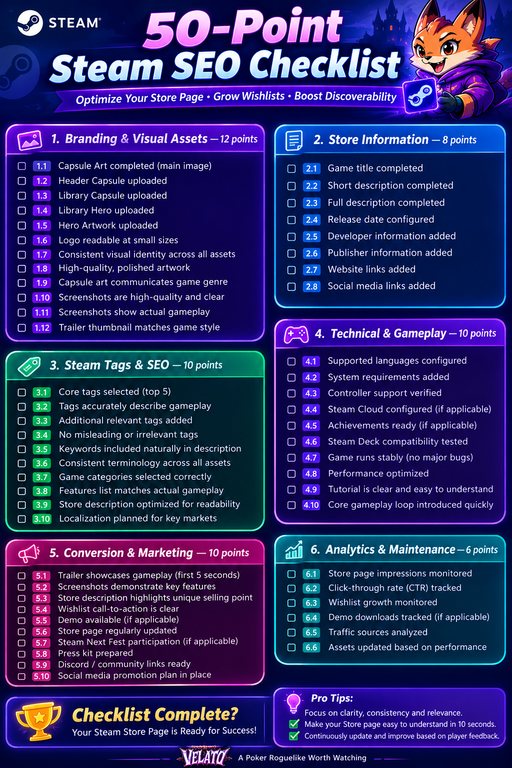
Checklist #1: Basic Store Information
Verify that you’ve completed:
- ✅ Game title
- ✅ Short description
- ✅ Full description
- ✅ Supported languages
- ✅ Release date
- ✅ Developer information
- ✅ Publisher information
- ✅ Website links
- ✅ Social media links
- ✅ Contact information
Missing information creates unnecessary friction for potential players.
Checklist #2: Categories & Features
Steam categories help players filter games based on functionality.
Select only features your game genuinely supports.
Examples include:
- Single-player
- Multiplayer
- Online Co-op
- Controller Support
- Steam Cloud
- Achievements
- Trading Cards
- Steam Deck Compatibility
Misleading categories can result in disappointed players and negative reviews.
Checklist #3: System Requirements
Many developers overlook this section.
Provide realistic minimum and recommended specifications.
Include:
- Operating system
- Processor
- Memory
- Graphics card
- Storage
- Additional notes when appropriate
Clear requirements reduce refund requests and improve player expectations.
Branding: Make Your Store Page Instantly Recognizable
Your visual identity should remain consistent across every Steam asset.
Players should immediately recognize your game whether they’re viewing:
- Search results
- Discovery Queue
- Wishlist
- Library
- News updates
Consistency builds trust and improves brand recognition.
Checklist #4: Capsule Art
Your capsule art is often the first impression players have of your game.
An effective capsule should:
- Be readable at small sizes.
- Feature a memorable logo.
- Communicate the game’s tone.
- Use strong visual contrast.
- Avoid excessive text.
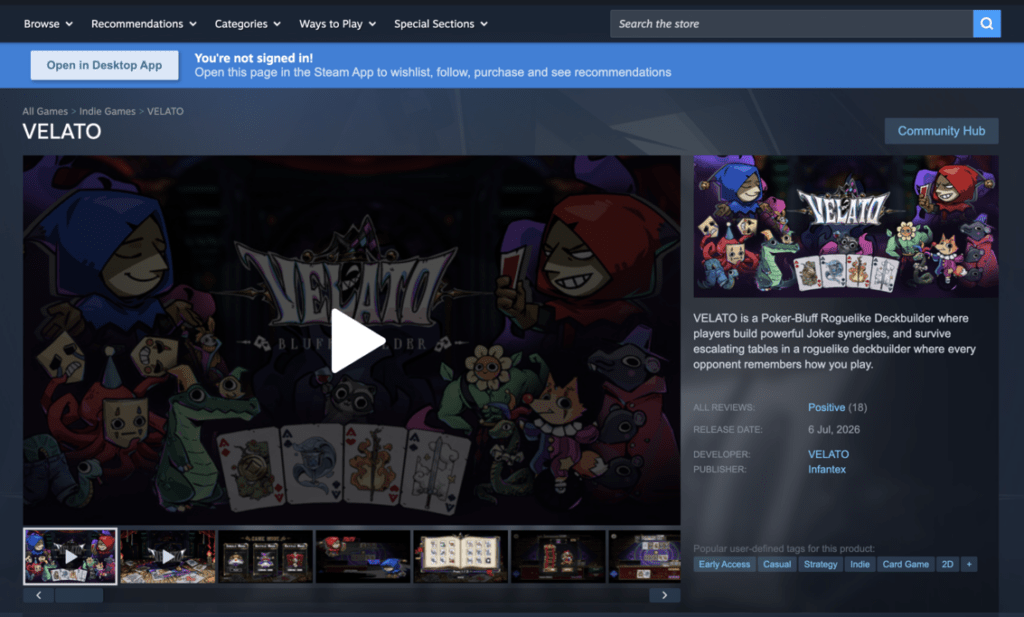
For example, Velato uses a distinctive logo combined with colorful fantasy artwork that stands out against Steam’s dark interface while reinforcing its poker roguelike identity.
For a detailed breakdown, see our companion guide: Steam Capsule Art Guide: Design Tips That Increase Click-Through Rate.
Checklist #5: Steam Library Assets
Many developers upload only the main capsule.
Steam also displays:
- Library Capsule
- Library Hero
- Logo
- Community assets
Using consistent branding across all assets creates a more polished experience.
Checklist #6: Screenshots
Screenshots should demonstrate actual gameplay—not marketing concepts.
Aim for variety by showing:
- Core gameplay
- User interface
- Different environments
- Character progression
- Combat encounters
- Boss battles
- Visual effects
Avoid uploading multiple screenshots that look nearly identical.
Each image should communicate something new.
Checklist #7: Trailer
Your trailer is one of the strongest conversion tools on your Store page.
An effective Steam trailer should:
- Show gameplay within the first five seconds.
- Explain the core gameplay loop quickly.
- Highlight unique mechanics.
- End with a clear wishlist message.
If players still don’t understand your game after watching the trailer, it’s probably too slow or too focused on cinematic footage.
For a complete walkthrough, see Steam Trailer Best Practices: Create Trailers That Turn Views Into Wishlists.
Checklist #8: Store Description
Many visitors skim rather than read.
Structure your description for readability.
Good descriptions include:
- A concise opening paragraph.
- Short sections.
- Bullet-point features.
- Clear explanations of gameplay.
- Screenshots or GIFs where appropriate.
- Calls-to-action.
Avoid large walls of text.
Instead, make important information easy to scan.
Case Study: Optimizing the Velato Store Page
Imagine a player discovering Velato through Steam Search.
Within seconds, they should understand:
- It’s a poker roguelike.
- Bluffing is a core mechanic.
- Every run is different.
- Strategic deckbuilding matters.
This message should remain consistent across:
- Capsule art.
- Trailer.
- Screenshots.
- Store description.
- Steam tags.
When every element reinforces the same identity, players quickly understand what makes the game unique—and whether it’s a good fit for them.
Steam Tags, Keywords & Discoverability
Once your Steam Store page looks professional, the next step is making sure players can actually find it.
This is where Steam SEO becomes more strategic.
While Google relies heavily on backlinks and content authority, Steam focuses on relevance. Its recommendation systems analyze how your game is categorized, how players interact with your Store page, and whether your game matches the interests of individual users.
Optimizing these elements can significantly improve your game’s discoverability over time.
Checklist #9: Choose the Right Steam Tags
Steam tags are among the strongest signals that help Steam understand your game.
They influence:
- Search results
- “More Like This” recommendations
- Discovery Queue
- Personalized recommendations
- Genre pages
Choosing accurate tags helps Steam recommend your game to players who are most likely to enjoy it.
How Steam Uses Tags
Think of tags as descriptors rather than marketing buzzwords.
For example, Steam doesn’t simply categorize Velato as a card game.
Instead, it can understand multiple aspects of the experience:
- Roguelike
- Deckbuilder
- Card Battler
- Turn-Based Strategy
- Fantasy
- Singleplayer
- Indie
Each tag increases the number of recommendation pathways available to your game.
The more accurately you describe your game, the more effectively Steam can match it with the right audience.
Checklist #10: Prioritize Your Core Tags
Your first few tags carry the most weight.
Ask yourself:
“What would players search for if they were looking for my game?”
For Velato, a logical priority might be:
- Roguelike
- Deckbuilder
- Card Battler
- Strategy
- Fantasy
These tags communicate the game’s core identity before introducing more specific characteristics.
Avoid leading with broad or secondary descriptors that don’t define the gameplay.
Avoid Misleading Tags
Some developers add popular tags simply because they attract traffic. This approach usually backfires.
For example, tagging a single-player strategy game as “Multiplayer” or “Open World” may increase impressions temporarily, but players will quickly leave your Store page when expectations aren’t met.
Low engagement sends negative signals to Steam’s recommendation systems.
The goal isn’t to maximize impressions.
It’s to maximize relevant impressions.
Checklist #11: Optimize Your Store Description
Your Store description isn’t just for players. It also reinforces the themes and mechanics that define your game.
The opening paragraph should answer three questions immediately:
- What is the game?
- What makes it unique?
- Why should players care?
For example:
Velato is a poker roguelike where bluffing, deckbuilding, and strategic decision-making combine to create unpredictable runs.
Within one sentence, readers understand the genre, the core mechanic, and the game’s unique identity.
Structure Your Description for Readability
Most visitors won’t read every word. Instead, they’ll scan. Break your description into short sections using clear headings.
A simple structure might include:
Overview
One concise paragraph introducing the game.
Key Features
Use bullet points such as:
- Build powerful poker hands.
- Unlock new cards and relics.
- Outsmart unique enemies.
- Discover new strategies every run.
Progression
Explain what motivates players to continue playing.
Replayability
Describe procedural generation, unlocks, or multiple endings if applicable.
This format is easier to read than long blocks of uninterrupted text.
Checklist #12: Use Consistent Keywords
Keywords? – Of course, it exert an important role for both Steam Page SEO Checklist and Google SEO Checklist. Your Steam page should consistently reinforce the same concepts.
If your game is a roguelike deckbuilder, those ideas should appear naturally throughout:
- Short description
- Full description
- Trailer
- Screenshots
- Tags
- Marketing materials
Consistency helps both players and Steam understand your game.
Avoid describing your project differently across different sections.
Checklist #13: Localize Your Store Page
Steam has a global audience.
While English remains the most common Store language, many players browse Steam in their native language.
Consider localizing your Store page into:
- Simplified Chinese
- Japanese
- Korean
- German
- French
- Brazilian Portuguese
- Spanish
Even if the game itself launches in English only, translating your Store page can improve discoverability in international markets. This is one of very important tip in Steam Page SEO Checklist.
Checklist #14: Keep Your Assets Consistent
Every visual asset should communicate the same artistic identity.
Review:
- Capsule Art
- Header Capsule
- Library Capsule
- Hero Artwork
- Logo
- Screenshots
- Trailer thumbnail
Players should immediately recognize your game regardless of where they encounter it.
For Velato, maintaining the same logo, fantasy artwork, and distinctive color palette across every asset reinforces its brand identity.
Checklist #15: Improve Click-Through Rate
Steam notices when players consistently click on your Store page.
Although Valve doesn’t publish its ranking algorithm, a higher click-through rate generally indicates that your presentation is appealing and relevant.
Ways to improve CTR include:
- Strong capsule art.
- Clear logo.
- Distinctive color palette.
- Instantly recognizable genre.
- Professional branding.
Your goal is to encourage curiosity without misleading players.
Checklist #16: Increase Wishlist Conversion
Getting visitors to your Store page is only the beginning.
The next objective is convincing them to click Add to Wishlist.
Successful Store pages usually communicate:
- What the game is.
- Why it’s different.
- Why players should care.
- Why they should wishlist today.
A strong wishlist conversion strategy combines:
- Clear gameplay.
- High-quality media.
- Compelling feature descriptions.
- Social proof where available.
- A polished overall presentation.
Case Study: How Velato Reinforces Its Identity
Imagine a player discovering Velato through the “Roguelike” tag.
The capsule art captures attention.
The trailer immediately shows poker hands being used in combat.
Screenshots highlight bluffing mechanics and colorful fantasy characters.
The Store description explains how deckbuilding and poker strategy work together.
Finally, the Steam tags reinforce exactly what players have already seen.
Every element tells the same story.
This consistency reduces confusion and increases the likelihood that interested players will wishlist the game.
Velato Steam Page SEO Checklist as a Reference: https://store.steampowered.com/app/4542750/VELATO/
Steam SEO Mistakes to Avoid
Even experienced developers make mistakes that reduce discoverability.
Avoid these common issues:
- Using inaccurate tags.
- Uploading cinematic screenshots instead of gameplay.
- Writing vague Store descriptions.
- Leading with story instead of gameplay.
- Using inconsistent branding across assets.
- Ignoring localization opportunities.
- Forgetting to update screenshots after major visual improvements.
- Choosing a trailer thumbnail that doesn’t represent the game.
Small issues may seem insignificant individually, but together they can reduce player confidence.
Mini Steam SEO Audit
Ask yourself these questions:
Branding
- Can players recognize my game instantly?
Tags
- Do my top five tags accurately describe the gameplay?
Description
- Does the first paragraph explain the game in under 30 seconds?
Screenshots
- Does every screenshot show meaningful gameplay?
Trailer
- Does gameplay appear immediately?
Wishlist
- Is there a compelling reason for players to wishlist the game today?
If you answered “No” to any of these questions, you’ve identified opportunities to improve your Store page.
Turning Visitors Into Wishlists
Attracting players to your Steam Store page is only the first step.
The real goal is converting those visitors into wishlists.
Every element of your Store page should answer one simple question:
“Why should I care about this game?”
If players immediately understand what your game is, what makes it unique, and why it’s worth following, they’re much more likely to wishlist it.
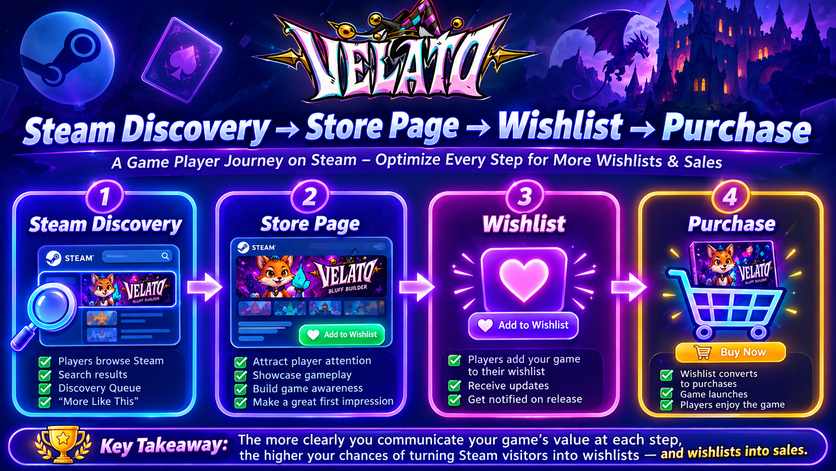
Checklist #17: Create a Strong First Impression
Steam users often decide whether to continue browsing within just a few seconds.
The first screen they see should communicate:
- The game’s genre.
- Its unique selling point.
- The visual style.
- The quality of the presentation.
Ask yourself:
If someone has never heard of my game before, can they understand it within 10 seconds?
If the answer is no, revisit your capsule art, screenshots, trailer, and opening description.
Checklist #18: Make Wishlisting the Natural Next Step
Your Store page shouldn’t pressure visitors—it should naturally guide them toward wishlisting.
You can reinforce this through:
- A polished trailer.
- Screenshots that show progression.
- A description highlighting replayability or unique mechanics.
- News posts demonstrating active development.
- A playable demo, if available.
Rather than repeatedly asking players to wishlist, show them enough value that the decision feels obvious.
Checklist #19: Keep Your Store Page Updated
A neglected Store page can signal that development has slowed.
Even before launch, regular updates help maintain interest.
Consider refreshing your page when you:
- Improve your game’s visuals.
- Add major gameplay features.
- Release a new trailer.
- Publish a demo.
- Participate in Steam Next Fest.
- Announce a release date.
Frequent, meaningful updates also give returning visitors a reason to check back.
Checklist #20: Monitor Performance Metrics
Optimization is an ongoing process.
Review your Steamworks analytics regularly to understand how players interact with your Store page.
Useful metrics include:
- Store page impressions.
- Click-through rate (CTR).
- Wishlist growth.
- Demo downloads.
- Traffic sources.
- Regional interest.
- Conversion rates during events.
Instead of reacting to one day’s data, look for trends over weeks or months.
Understanding the Steam Conversion Funnel
Every visitor moves through a series of decisions before becoming a customer.
Steam Discovery

↓

Capsule Art

↓

Store Page Visit

↓

Trailer & Screenshots

↓

Read Description

↓

Wishlist

↓

Purchase

↓

Review
Improving any stage of this funnel can increase the overall conversion rate.
For example:
- Better capsule art increases clicks.
- Better trailers improve engagement.
- Better screenshots increase confidence.
- Better descriptions clarify the gameplay.
- Better demos encourage wishlisting.
Small improvements compound over time.
Checklist #21: Use Events to Refresh Visibility
Steam provides several opportunities to attract new audiences throughout the year.
Examples include:
- Steam Next Fest
- Seasonal Sales
- Genre Festivals
- Daily Deals
- Publisher Sales
Before participating in any event, make sure your Store page reflects the current quality of your game.
Avoid promoting outdated screenshots or trailers.
Checklist #22: Build Trust With Consistency
Players notice inconsistencies.
For example:
- Beautiful capsule art but poor screenshots.
- Exciting trailer but confusing description.
- Strategy tags but action-focused gameplay.
- High-quality artwork with unfinished UI.
Consistency builds credibility.
Every element of your Store page should reinforce the same message.
Checklist #23: Optimize for Steam Deck
Steam Deck continues to influence purchasing decisions.
If your game runs well on Steam Deck:
- Verify controller support.
- Ensure text remains readable.
- Optimize UI scaling.
- Test performance on lower-power hardware.
If your game earns Steam Deck verification, highlight that advantage on your Store page.
Checklist #24: Encourage Community Engagement
Players often evaluate not only the game itself but also the developer behind it.
Ways to demonstrate active development include:
- Posting development updates.
- Responding to community questions.
- Sharing roadmap announcements.
- Publishing patch notes.
- Highlighting community feedback.
An active developer presence builds confidence and encourages players to follow your project through launch.
Case Study: Auditing the Velato Steam Page SEO Checklist
Let’s imagine reviewing the Velato Store page using this checklist.
Branding
✅ Distinctive fantasy artwork.
✅ Readable logo.
✅ Consistent visual identity.
Tags
✅ Roguelike
✅ Deckbuilder
✅ Card Battler
✅ Strategy
These accurately communicate the game’s core mechanics.
Screenshots
Strong gameplay moments.
Multiple environments.
Card interactions.
Combat examples.
Trailer
Gameplay appears immediately.
Poker mechanics are demonstrated early.
Fast pacing keeps viewers engaged.
Description
Clearly explains:
- Bluffing.
- Poker mechanics.
- Roguelike progression.
- Replayability.
Every section reinforces the game’s identity.
Overall
The Store page consistently presents Velato as a poker roguelike rather than simply another deckbuilder.
That clarity helps attract the right audience.
The Complete Steam Page SEO Checklist
Branding
- □ Capsule Art completed
- □ Header Capsule uploaded
- □ Library Capsule uploaded
- □ Hero Artwork uploaded
- □ Logo readable at small sizes
Store Information
- □ Short description completed
- □ Full description completed
- □ Release date configured
- □ Languages selected
- □ System requirements added
Screenshots
- □ Gameplay shown immediately
- □ UI visible
- □ Multiple environments
- □ Character progression
- □ Boss encounters
- □ Updated visuals
Trailer
- □ Gameplay within first 5 seconds
- □ 60–90 second runtime
- □ Shows core gameplay loop
- □ Good pacing
- □ Clear ending
Steam Tags
- □ Core tags selected
- □ Accurate genre tags
- □ Relevant gameplay tags
- □ No misleading tags
Store Description
- □ Strong opening paragraph
- □ Bullet-point features
- □ Clear gameplay explanation
- □ Replayability highlighted
- □ Easy to scan
Technical
- □ Controller support
- □ Steam Cloud configured
- □ Achievements ready
- □ Steam Deck tested
- □ Stable performance
Marketing
- □ Demo available
- □ Trailer updated
- □ Press kit prepared
- □ Discord linked
- □ Wishlist messaging included
Analytics
- □ Monitor impressions
- □ Monitor CTR
- □ Track wishlist growth
- □ Review traffic sources
- □ Evaluate conversion after updates
Common Steam SEO Mistakes
Avoid these mistakes when optimizing your Store page:
- Choosing tags based on popularity rather than relevance.
- Uploading cinematic screenshots instead of gameplay.
- Leading the description with story instead of gameplay.
- Using outdated trailers after major visual improvements.
- Ignoring localization for key markets.
- Failing to update Store assets before major events.
- Overloading the page with marketing buzzwords.
- Inconsistent branding between capsule art, screenshots, and trailers.
- Forgetting to test the Store page from a player’s perspective.
- Treating Steam SEO as a one-time task instead of an ongoing process.
Steam Page SEO Audit Worksheet
Schedule a Store page review every few months or before major marketing beats.
Ask yourself:
Visibility
- Can players quickly identify my game’s genre?
Branding
- Are all visual assets consistent?
Messaging
- Does the Store page explain what makes my game unique?
Media
- Are the trailer and screenshots up to date?
Conversion
- Is there a compelling reason to wishlist the game today?
If you answer “No” to any question, create an action plan before your next event or update.
Final Thoughts
Optimizing a Steam Store page isn’t about gaming an algorithm—it’s about helping the right players discover and understand your game.
Strong Steam SEO comes from consistency. Your capsule art, screenshots, trailer, Store description, tags, and branding should all communicate the same core message. When they do, Steam’s recommendation systems have clearer signals to work with, and potential players can decide more quickly whether your game matches their interests.
Throughout this guide, we’ve used Velato as an example of how a distinctive identity can be reinforced across every part of a Store page. By consistently presenting itself as a poker roguelike with bluffing mechanics, strategic deckbuilding, and high replayability, the page speaks directly to the audience most likely to enjoy it.
Remember that your Steam Store page is never truly finished. As your game evolves, so should your assets, messaging, and presentation. Regular updates, thoughtful testing, and ongoing analysis can steadily improve both discoverability and conversion over the lifetime of your project.
Related Posts
- How to Set Up a Store Page on Steam
- Steam Tags Explained: How to Choose the Best Tags for Your Indie Game
- Steam Capsule Art Guide: Design Tips That Increase Click-Through Rate
- Steam Trailer Best Practices: Create Trailers That Turn Views Into Wishlists
- How to Create a Steam Demo
- What Is an Indie Game?
- Velato: A Poker Roguelike Worth Watching
References
Official Steamworks Documentation
- Steamworks Store Presence Documentation
https://partner.steamgames.com/doc/store - Steamworks Store Assets Documentation
https://partner.steamgames.com/doc/store/assets - Steamworks Visibility Documentation
https://partner.steamgames.com/doc/marketing/visibility - Steamworks Tags Documentation
https://partner.steamgames.com/doc/store/tags
Additional Resources
- SteamDB — https://steamdb.info/
- GameDiscoverCo — https://newsletter.gamediscover.co/
- HowToMarketAGame — https://howtomarketagame.com/